Render
The Render Component enables an entity to render a primitive shape or a render asset.
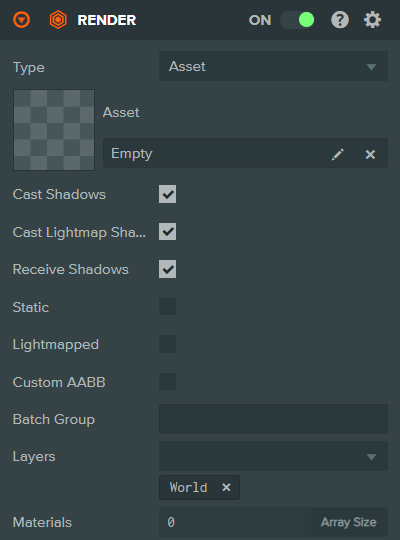
Properties
| Property | Description |
|---|---|
| Type | The type of the graphical object to be rendered. Can be: Asset, Box, Capsule, Cone, Cylinder, Plane, Sphere. |
| Asset | Asset type only. The render asset to be rendered by this render component. Only a single render asset can be assigned to a render component. |
| Root Bone | Asset type only (skinned meshes). The entity to be used as the root bone for any skinned meshes that are rendered by this component. |
| Cast Shadows | If enabled, the mesh instances rendered by this component will cast shadows onto other mesh instances in the scene. |
| Cast Lightmap Shadows | If enabled, the mesh instances rendered by this component will cast shadows into lightmaps. |
| Receive Shadows | If enabled, the mesh instances rendered by this component will receive shadows cast by other mesh instances in the scene. |
| Static | If the entity referencing this render component never moves, check this box as a hint to the engine to make certain optimizations. |
| Lightmapped | If enabled, this component's mesh instances do not receive lighting from dynamic lights. Instead they receive lighting generated by lightmap-baking lights. |
| Lightmap Size Multiplier | A multiplier applied to the calculated lightmap size for this mesh. Increase for higher resolution lightmaps. Only shown when Lightmapped is enabled. |
| Custom AABB | If enabled, allows specifying a custom axis-aligned bounding box for visibility culling instead of using the automatically calculated one. This is an optimization for skinned characters to avoid per-frame bounding box computations based on bone positions. |
| AABB Center | The center position of the custom bounding box. Only shown when Custom AABB is enabled. |
| AABB Half Extents | The half-extents (half width, height, depth) of the custom bounding box. Only shown when Custom AABB is enabled. |
| Batch Group | The batch group that this component's mesh instances belong to. |
| Layers | The layers to render this component's mesh instances into. |
| Materials | The material assets that will be used to render the mesh instances of this component. Each material corresponds to the respective mesh instance. |
See Also
- Render Assets - Learn about render assets
Scripting Interface
You can control a Render Component's properties using a Script Component. The Render Component's scripting interface is here.