GSplat
The GSplat Component enables an entity to render a 3D Gaussian Splat.
Splat scenes on this page: Trogir, Croatia by tosolini, CC BY 4.0.
Properties
| Property | Description |
|---|---|
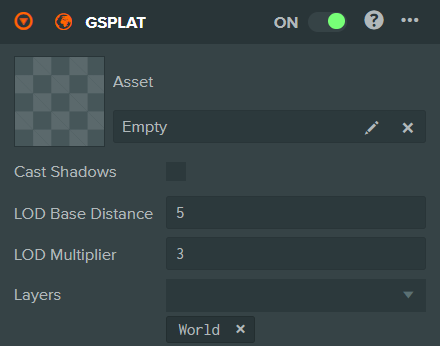
| Asset | The GSplat asset to be rendered by this GSplat Component. Only a single GSplat asset can be assigned to a GSplat Component. |
| Cast Shadows | When enabled, the splat casts shadows for lights that have shadow casting enabled. |
| LOD Range Min | Lowest LOD level used when rendering this Gaussian splat. Integer, minimum 0. |
| LOD Range Max | Highest LOD level used when rendering this Gaussian splat. Integer, minimum 0. |
| LOD Falloff | Controls how strongly detail is concentrated near the camera within the global splat budget. 0 spreads detail evenly. Range 0 to 8. |
| Layers | The layers to render this element into. |
note
LOD Range only has an effect on streamed SOG octrees. The LOD level is clamped to the number of levels the asset actually has, and a single .sog or .ply file is a single level — the fields are still shown, but changing them does nothing.
Scene-wide Gaussian splat behaviour, including the global splat budget these LOD settings work within, is configured in Rendering Settings.
See Also
- Gaussian Splatting - Learn more about 3D Gaussian Splats
- Rendering Settings - Scene-wide Gaussian splat settings
Scripting Interface
You can control a GSplat Component's properties using a Script Component. The GSplat Component's scripting interface is here.