Sprite
The Sprite Component renders and animates Sprite Assets into the scene.
There are two types of sprite: Simple and Animated.
Simple Sprites
Simple Sprite Components display a single frame from an atlas.
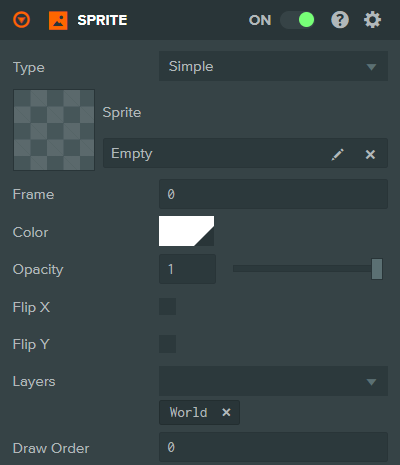
Simple Sprite Component Properties
| Property | Description |
|---|---|
| Type | Simple or Animated. |
| Sprite | The Sprite Asset to display. |
| Frame | The frame index of the Sprite to display. |
| Width | The width of the sprite when using 9-slicing (only shown for sliced/tiled sprites). |
| Height | The height of the sprite when using 9-slicing (only shown for sliced/tiled sprites). |
| Color | A color to apply as a tint to the sprite. |
| Opacity | The transparency of the sprite (0 to 1). |
| Flip X | Flip the rendered sprite horizontally. |
| Flip Y | Flip the rendered sprite vertically. |
| Batch Group | The Batch Group that this sprite belongs to. More on Batching here. |
| Layers | The Layers in which to render the sprite. |
| Draw Order | The order in which this sprite is rendered. Lower numbers are rendered first. |
Animated Sprites
Animated Sprite Components have multiple Sprite Animation Clips attached which can play back different Sprite Assets.

Animated Sprite Component Properties
| Property | Description |
|---|---|
| Type | Simple or Animated. |
| Color | A color to apply as a tint to the sprite. |
| Opacity | The transparency of the sprite (0 to 1). |
| Flip X | Flip the rendered sprite horizontally. |
| Flip Y | Flip the rendered sprite vertically. |
| Speed | Multiplier applied to the speed at which sprite animation clips on this sprite component are animated. |
| Layers | The Layers in which to render the sprite. |
| Draw Order | The order in which this sprite is rendered. Lower numbers are rendered first. |
| Auto Play | The name of a sprite animation clip to play when the sprite is enabled. Select from available clips or None. |
Sprite Animation Clip Properties
| Property | Description |
|---|---|
| Name | The name of the Sprite Animation Clip. Used to reference an individual clip. |
| Loop | If true the animation clip will loop back to the start when it reaches the end. |
| Frames Per Second | The speed at which the clip is played in Frames Per Second. |
| Sprite | The Sprite Asset which is used to play this clip. |
See Also
- Sprite Assets - Learn about creating sprite assets
Scripting Interface
You can control a Sprite Component's properties using a Script Component. The Sprite Component's scripting interface is here.