Scroll View
The Scroll View Component defines a scrollable area in a user interface. A Scroll View can be scrolled via Scrollbar Components.
See the User Interface section for more details.
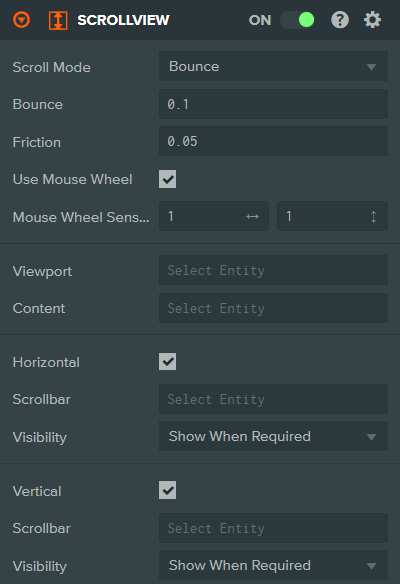
Properties
| Property | Description |
|---|---|
| Scroll Mode | Specifies how the scroll view should behave when the user scrolls past the end of the content. Options: Clamp (content stops at bounds), Bounce (content bounces back), Infinite (content scrolls forever). |
| Bounce | Bounce mode only. Controls how far the content should move before bouncing back (0 to 10). |
| Friction | Controls how freely the content should move if thrown (e.g., by flicking on a phone or flinging the scroll wheel). A value of 1 means content stops immediately; 0 means content continues moving forever (or until bounds are reached, depending on scroll mode). |
| Use Mouse Wheel | Whether to use mouse wheel for scrolling (horizontally and vertically) when the mouse is within bounds. |
| Mouse Wheel Sensitivity | Use Mouse Wheel only. Mouse wheel horizontal and vertical sensitivity. Setting a direction to 0 disables scrolling in that direction. Default is [1, 1]. |
| Viewport | The entity to be used as the masked viewport area, within which the content will scroll. This entity must have an Element Component. |
| Content | The entity which contains the scrolling content itself. This entity must have an Element Component. |
| Horizontal | Whether to enable horizontal scrolling. |
| Scrollbar (horizontal) | Horizontal only. The entity to be used as the horizontal scrollbar. This entity must have a Scrollbar Component. |
| Visibility (horizontal) | Horizontal only. Controls scrollbar visibility. Options: Show Always, Show When Required (only when content exceeds viewport). |
| Vertical | Whether to enable vertical scrolling. |
| Scrollbar (vertical) | Vertical only. The entity to be used as the vertical scrollbar. This entity must have a Scrollbar Component. |
| Visibility (vertical) | Vertical only. Controls scrollbar visibility. Options: Show Always, Show When Required (only when content exceeds viewport). |
See Also
- Scrollbar Component - Controls for scrolling the view
- Element Component - Required for the viewport and content
- User Interface - Learn more about building user interfaces
Scripting Interface
You can control a Scroll View Component's properties using a Script Component. The Scroll View Component's scripting interface is here.