Screen
The Screen Component defines the area and rendering of a user interface. Children added to a Screen Component should all have an Element Component.
See the User Interface section for more details.
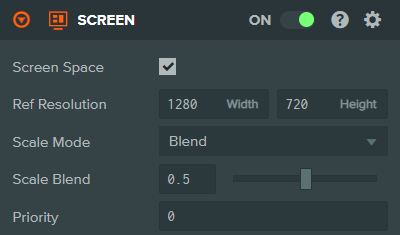
Properties
| Property | Description |
|---|---|
| Screen Space | When enabled, the contents of the screen are rendered in 2D as an overlay to the canvas. |
| Resolution | When Screen Space is disabled. The resolution of the screen coordinates (width and height). Screen coordinates increase as you move right and up. |
| Ref Resolution | Screen Space only, when Scale Mode is Blend. The reference resolution used to calculate the scale factor (width and height). |
| Scale Mode | Screen Space only. Determines how the user interface scales when the window size does not match the screen size. Options: None (no scaling), Blend (scales by ratio of reference to actual resolution). |
| Scale Blend | Screen Space only, when Scale Mode is Blend. The weighting of scaling between horizontal (0) and vertical (1). |
| Priority | Determines the order in which Screen Components in the same layer are rendered. Higher priority is rendered on top. Must be an integer between 0 and 127. |
See Also
- Element Component - UI elements that are children of the screen
- Button Component - Interactive button elements
- User Interface - Learn more about building user interfaces
Scripting Interface
You can control a Screen Component's properties using a Script Component. The Screen Component's scripting interface is here.