Rigid Body
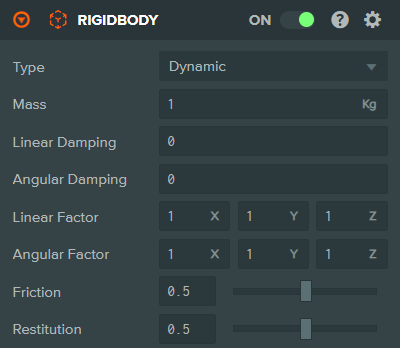
The Rigid Body Component enables an entity to participate in the scene's physics simulation. This allows the movement of an entity to be simulated realistically. The component interface dynamically displays different attributes based on the 'Type' attribute.
Static

Dynamic
Kinematic

Note that you must add a Collision Component to the same entity in order to define the shape of the rigid body. Otherwise, the Rigid Body Component has no effect and will not participate in the physics simulation.
Properties
| Property | Description |
|---|---|
| Type | The type of the body. Options: Static, Dynamic, Kinematic. |
| Mass | Dynamic only. The mass of the body in kilograms (when world units are meters). |
| Linear Damping | Dynamic only. Specifies the proportion of linear velocity lost per second (0 to 1). |
| Angular Damping | Dynamic only. Specifies the proportion of angular velocity lost per second (0 to 1). |
| Linear Factor | Dynamic only. Multiplier for the body's linear movement in each world axis (X, Y, Z). If set to 0 for any axis, no movement will occur in that axis - useful for creating 2D games or constrained movement. |
| Angular Factor | Dynamic only. Multiplier for the body's angular (rotational) movement about each world axis (X, Y, Z). If set to 0 for any axis, no rotation will occur around that axis. |
| Friction | Controls how quickly a body loses velocity when in contact with other bodies (0 to 1). |
| Restitution | A measure of the bounciness of a body (0 to 1). Warning: setting to 1 means a moving body will never come to a stop (unless colliding with other bodies with restitutions below 1, or unless a stop is scripted). |
See Also
- Collision Component - Required to define the rigid body's shape
- Physics - Learn more about the physics system
Scripting Interface
You can control a Rigid Body Component's properties using a Script Component. The Rigid Body Component's scripting interface is here.