Particle System
The Particle System Component specifies a particle emitter in 3D space.
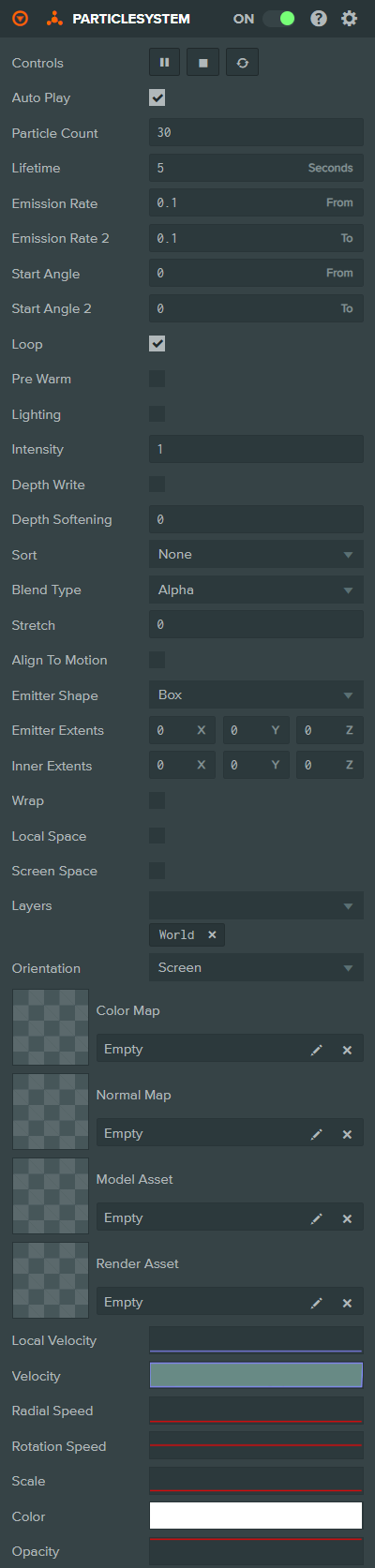
Properties
Basic Settings
| Property | Description |
|---|---|
| Auto Play | If checked, the particle system will play immediately on creation. If this option is left unchecked, you will need to call the particle system component's play function from script. |
| Particle Count | The maximum number of particles managed by this particle system. |
| Lifetime | The length of time in seconds between a particle's birth and its death. |
| Emission Rate | The lower bound of the time range defining the interval between particle births. The time for the next particle emission will be chosen at random between Emission Rate and Emission Rate 2. |
| Emission Rate 2 | The upper bound of the time range defining the interval between particle births. The time for the next particle emission will be chosen at random between Emission Rate and Emission Rate 2. |
| Start Angle | The lower bound of the initial particle rotation specified in degrees. For each particle, this angle is chosen at random between Start Angle and Start Angle 2. |
| Start Angle 2 | The upper bound of the initial particle rotation specified in degrees. For each particle, this angle is chosen at random between Start Angle and Start Angle 2. |
| Loop | If checked, the particle system will emit indefinitely. Otherwise, it will emit the number of particles specified by the Particle Count property and then stop. |
| Pre Warm | If enabled, the particle system will be initialized as though it had already completed a full cycle. This option is only available for looping particle systems. |
Lighting
| Property | Description |
|---|---|
| Lighting | If checked, the particle will be lit by the directional and ambient light in the scene. In some circumstances, it may be advisable to set a normal map on the particle system in order to achieve more realistic lighting. |
| Half Lambert | Enabling Half Lambert lighting avoids particles looking too flat when lights appear to be shining towards the back sides of the particles. It is a completely non-physical lighting model but can give more pleasing visual results. This option is only available when Lighting is enabled. |
| Intensity | Scales the color of particles to allow them to have arbitrary brightness. |
Rendering
| Property | Description |
|---|---|
| Depth Write | If checked, the particles will write depth information to the depth buffer. If unchecked, the depth buffer is left unchanged and particles will be guaranteed to overwrite one another in the order in which they are rendered. |
| Depth Softening | Determines how much particles fade out as they get closer to another surface. This avoids the situation where particles appear to cut into surfaces. Setting this value to zero effectively disables depth softening. Setting a value greater than zero requires the scene to be rendered to a depth target for depth comparisons to be performed. This can have a significant performance impact by increasing the overall number of draw calls submitted every frame. |
| Sort | Sorting mode gives you control over the order in which particles are rendered. Options: None (GPU simulated, best performance), Camera Distance (back to front), Newest First, Oldest First. |
| Blend Type | The blending mode determines how particles are composited when written to the frame buffer. Options: Alpha, Additive, Multiply. |
| Stretch | A value in world units that controls the amount by which particles are stretched based on their velocity. Particles are stretched from their center towards their previous position. |
| Align To Motion | Orient particles in their direction of motion. |
Emitter Shape
| Property | Description |
|---|---|
| Emitter Shape | The shape of the emitter volume. Options: Box, Sphere. |
| Emitter Extents | Box shape only. The half extents of the box-shaped emitter volume in local space within which particles are spawned at random positions. |
| Inner Extents | Box shape only. The inner half extents of the box-shaped emitter volume. Particles will spawn between the inner and outer extents. |
| Emitter Radius | Sphere shape only. The radius of the sphere-shaped emitter volume within which particles are spawned at random positions. |
| Inner Radius | Sphere shape only. The inner radius of the sphere-shaped emitter volume. Particles will spawn between the inner and outer radius. |
Space and Layers
| Property | Description |
|---|---|
| Wrap | Enables wrap bounds. |
| Wrap Bounds | World space AABB volume centered on the owner entity's position. If a particle crosses the boundary of one side of the volume, it teleports to the opposite side. You can use this to make environmental effects like rain by moving a wrapped emitter's owner entity. |
| Local Space | If enabled, particles are simulated in local space instead of world space. This means they will move with the emitter entity. |
| Screen Space | If enabled, particles are rendered in screen space, useful for 2D UI effects. |
| Layers | The layers to render this particle system into. |
Orientation
| Property | Description |
|---|---|
| Orientation | Controls how particles are oriented. Options: Screen (face the camera), World Normal (face a fixed world direction), Emitter Normal (face the emitter's normal direction). |
| Particle Normal | The normal vector used for particle orientation when Orientation is set to World Normal or Emitter Normal. |
Textures
| Property | Description |
|---|---|
| Color Map | The color map texture to apply to all particles in the system. If no texture asset is assigned, a default spot texture is used. |
| Normal Map | The normal map texture to apply to all particles in the system. Applying a normal map can make billboard particles appear more consistent with the scene's lighting. |
Sprite Sheet Animation
These properties are shown when a Color Map or Normal Map is assigned.
| Property | Description |
|---|---|
| Horizontal Tiles | The number of horizontal tiles (columns) in the sprite sheet. |
| Vertical Tiles | The number of vertical tiles (rows) in the sprite sheet. |
| Animation Count | The number of distinct animations in the sprite sheet. |
| Animation Index | The index of the animation to play. Disabled when Randomize Index is enabled. |
| Randomize Index | If enabled, each particle will randomly select an animation index. |
| Frame Count | The number of frames in the animation. |
| Start Frame | The frame index to start the animation from. |
| Animation Speed | The speed at which the animation plays. |
| Animation Loop | If enabled, the animation will loop. |
Mesh
| Property | Description |
|---|---|
| Model Asset | A model asset. The first mesh found in the model is used to represent all particles rather than a flat billboard. |
| Render Asset | A render asset. The mesh is used to represent all particles rather than a flat billboard. Only one of Model Asset or Render Asset can be set. |
Curves
| Property | Description |
|---|---|
| Local Velocity | A curve defining how each particle's velocity with respect to the particle system's local coordinate system changes over time. If two curves are specified in the curve editor, local velocity will be a random lerp between both curves. |
| Velocity | A curve defining how each particle's velocity with respect to the world coordinate system changes over time. If two curves are specified in the curve editor, velocity will be a random lerp between both curves. |
| Radial Speed | A curve defining how each particle's radial velocity (away from the emitter center) changes over time. If two curves are specified, the radial speed will be a random lerp between both curves. |
| Rotation Speed | A curve defining how each particle's angular velocity changes over time. If two curves are specified in the curve editor, the angular velocity will be a random lerp between both curves. |
| Scale | A curve defining how each particle's scale changes over time. By default, a particle is 1 unit in width and height. If two curves are specified in the curve editor, the scale will be a random lerp between both curves. |
| Color | A curve defining how each particle's color changes over time. |
| Opacity | A curve defining how each particle's opacity changes over time. If two curves are specified in the curve editor, the opacity will be a random lerp between both curves. |
See Also
- Particle System - Learn more about particle systems
Scripting Interface
You can control a Particle System Component's properties using a Script Component. The Particle System Component's scripting interface is here.