Layout Group
The LayoutGroup Component enables an entity to specify the size and position of child Element Components.
See the Layout Groups section for more details.
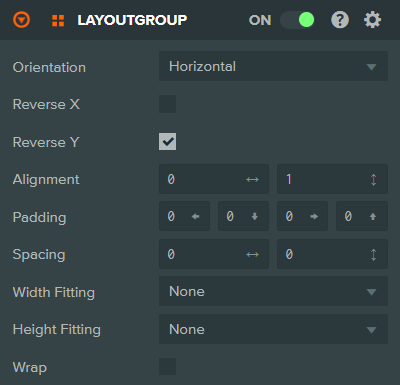
Properties
| Property | Description |
|---|---|
| Orientation | Whether the layout should run horizontally or vertically. Options are: Horizontal, Vertical. |
| Reverse X | Reverses the order of children along the x axis. |
| Reverse Y | Reverses the order of children along the y axis. |
| Alignment | Specifies the horizontal and vertical alignment of child elements. Values range from 0 to 1 where (0, 0) is the bottom left and (1, 1) is the top right. |
| Padding | Padding to be applied inside the container before positioning any children. Specified as left, bottom, right, and top values. |
| Spacing | Spacing to be applied between each child element, specified as horizontal and vertical values. |
| Width Fitting | Fitting logic to be applied when positioning and scaling child elements horizontally. Options are: None, Stretch, Shrink, Both. |
| Height Fitting | Fitting logic to be applied when positioning and scaling child elements vertically. Options are: None, Stretch, Shrink, Both. |
| Wrap | Whether or not to wrap children onto a new row/column when the size of the container is exceeded. |
See Also
- LayoutChild Component - Override layout behavior for individual children
- Element Component - Required for UI layout
- Layout Groups - Learn more about layout groups
Scripting Interface
You can control a LayoutGroup Component's properties using a Script Component. The LayoutGroup Component's scripting interface is here.