Camera
The Camera Component enables an entity to render a scene from a certain viewpoint.
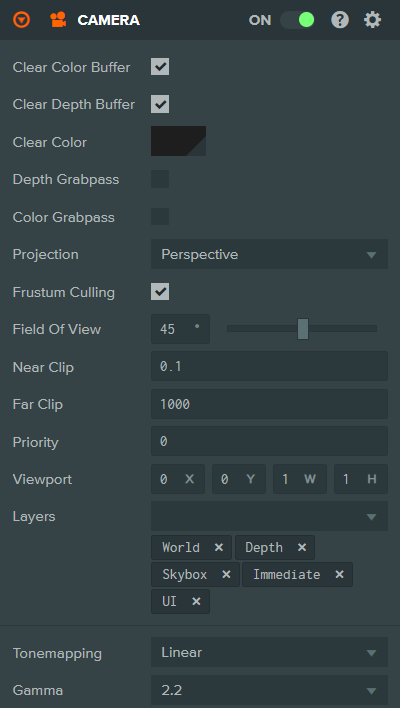
Properties
| Property | Description |
|---|---|
| Clear Color Buffer | If enabled, the camera will explicitly clear its render target to the chosen clear color before rendering the scene. |
| Clear Depth Buffer | If enabled, the camera will explicitly clear the depth buffer of its render target before rendering the scene. |
| Clear Color | The color used to clear the camera's render target. This property is only displayed if 'Clear Color Buffer' is enabled. |
| Depth Grabpass | If enabled, the camera will render the scene's depth to a depth map texture which can be accessed in shaders. Useful for effects like soft particles or depth-based post-processing. |
| Color Grabpass | If enabled, the camera will render the scene's color to a color map texture which can be accessed in shaders. Useful for effects like refraction or screen-space distortion. |
| Projection | The projection type of the camera. Options are:
|
| Frustum Culling | If enabled, the camera will only render mesh instances whose axis-aligned bounding boxes intersect with the camera's view frustum. Otherwise, the entire scene will be rendered regardless of visibility. |
| Field of View | The angle between top and bottom clip planes of a perspective camera. This property is only displayed if 'Projection' is set to 'Perspective'. |
| Ortho Height | The distance in world units between the top and bottom clip planes of an orthographic camera. This property is only displayed if 'Projection' is set to 'Orthographic'. |
| Near Clip | The distance in camera space from the camera's eye point to the near clip plane. |
| Far Clip | The distance in camera space from the camera's eye point to the far clip plane. |
| Priority | A number that defines the order in which camera views are rendered by the engine. Smaller numbers are rendered first. |
| Viewport | A rectangle that specifies the viewport onto the camera's attached render target. This allows you to implement features like split-screen or picture-in-picture. It is defined by normalized coordinates (0 to 1) in the following format: X (lower left x), Y (lower left y), W (width), H (height). |
| Layers | The layers that this camera will render. Only mesh instances on matching layers will be rendered by this camera. |
| Tonemapping | The tonemapping algorithm to apply when rendering HDR content. Options are: Linear, Filmic, Hejl, ACES, ACES2, Neutral. This property is only available with Engine v2. |
| Gamma | The gamma correction value to apply. Options are 1.0 (no correction) or 2.2 (standard gamma). This property is only available with Engine v2. |
See Also
- Cameras - Learn more about cameras
Scripting Interface
You can control a Camera Component's properties using a Script Component. The Camera Component's scripting interface is here.