Sprite
A Sprite is a 2D graphic that can be rendered into a scene. A Sprite asset is a reference to a Texture Atlas and a sequence of frames from that atlas. In this way a sprite can either represent a single image (taken out of the atlas) or a flip-book style animation (multiple frames from the atlas).
Inspector
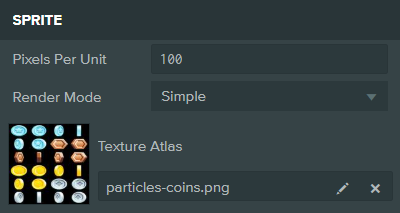
Properties
| Property | Description |
|---|---|
| Pixels Per Unit | The number of pixels in the sprite image that maps to 1 Unit in the PlayCanvas scene. For example, if pixelsPerUnit is 1 and the sprite is 32x32, it will be 32 units across and high when rendered in the scene. By default, a sprite with Simple render mode has pixelsPerUnit set to 100, meaning a 100x100 sprite will be 1 unit wide/high. Sliced sprites default to 1 because they are typically used for UI where 1 sprite pixel should map to 1 screen pixel. |
| Render Mode | Controls how the sprite is rendered: Simple - the sprite does not use border values; Sliced - uses border values to perform 9-sliced rendering by stretching; Tiled - uses border values to perform 9-sliced rendering by tiling. |
| Texture Atlas | The Texture Atlas asset that the sprite references. |
tip
To use this asset in scripts, see Asset Attributes.