Asset Inspectors
When you select an asset in the Assets Panel, its properties are displayed in the Inspector. Each asset type has its own set of configurable properties.
Common Properties
All asset inspectors display a common set of properties in the header section:
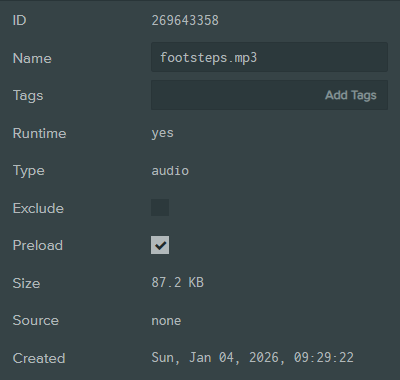
| Property | Description |
|---|---|
| ID | The unique identifier for the asset. Useful for referencing the asset in scripts. |
| Name | The display name of the asset. This can be edited to rename the asset. |
| Tags | Tags assigned to the asset for organization and filtering, both in the Assets Panel and at runtime via the Engine API. |
| Type | The asset type (read-only). |
| Exclude | When enabled, the asset is excluded from the published build. Useful for development-only assets such as test scripts or READMEs. |
| Preload | When enabled, the asset is loaded at application startup. When disabled, referenced assets load asynchronously after the app starts, while unreferenced assets must be loaded manually via script. |
| Size | The file size of the asset (read-only). |
| Source | A reference to the source asset from which this asset was derived, if applicable (read-only). |
| Created | The date and time the asset was created (read-only). |
Script Assets
Script assets display additional properties:

| Property | Description |
|---|---|
| Loading Order | Opens the script loading order manager to control the order scripts are loaded. |
| Loading Type | Controls when the script is loaded:
|
Asset Store Assets
Assets imported from the Asset Store display additional attribution properties:

| Property | Description |
|---|---|
| License | The license under which the asset is provided, with a link to license details. |
| Author | The original author of the asset, with a link to their profile. |
Asset Types
| Type | Imported From | Resource Extensions | Description |
|---|---|---|---|
animation | .glb, .fbx | .glb | Animation keyframe data |
audio | .mp3, .wav, .ogg | .mp3, .wav, .ogg | Sound data |
binary | .bin | .bin | Binary data |
bundle | Created in the Editor | .tar | Bundled assets |
css | .css | .css | Stylesheets for HTML |
cubemap | .png, .jpg, .webp, .avif | .png, .jpg, .webp, .avif | Environment lighting data |
font | .ttf, .woff | .json, .png | Font data for rendering text |
gsplat | .ply | .ply | 3D Gaussian Splat data |
html | .html | .html | HTML documents |
json | .json | .json | JSON documents |
material | .glb, .fbx | None | Material definitions for 3D models |
render | .glb, .fbx | .glb | 3D mesh data |
script | .js, .mjs | .js, .mjs | Scripts |
shader | .glsl, .vert, .frag | .glsl, .vert, .frag | Custom shaders for rendering |
sprite | Created in the Editor | None | 2D images for UIs or textures |
template | .glb | None | Templates for entity hierarchy |
text | .txt | .txt | Text documents |
texture-atlas | .png, .jpg, .webp, .avif | .png, .jpg, .webp, .avif | Sprite sheet image data |
texture | .png, .jpg, .webp, .avif | .png, .jpg, .webp, .avif | Image data for 3D models or UIs |
wasm | .wasm | .wasm | WebAssembly modules |