Masks
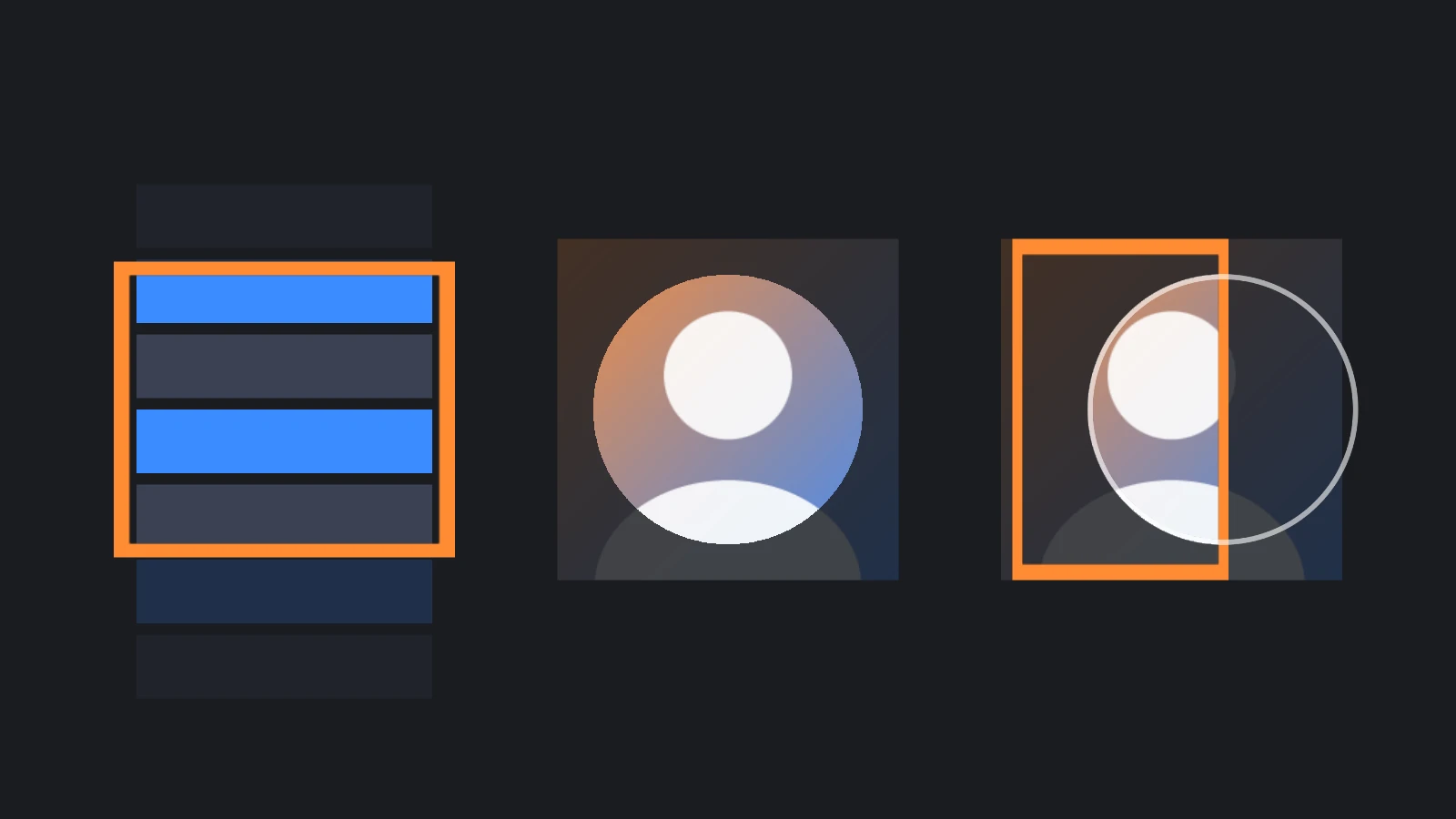
A mask clips the elements below it in the hierarchy, so that they are drawn only inside it. Scroll views use one to hide their content outside the viewport, and masks also make round avatars, portholes and reveal effects.
Creating a Mask
Any image element can be a mask. Turn on its mask property, and put the elements to clip below it:
- Engine
- Editor
- React
- Web Components
const viewport = new pc.Entity('viewport');
viewport.addComponent('element', {
    type: pc.ELEMENTTYPE_IMAGE,
    anchor: [0.5, 0.5, 0.5, 0.5],
    pivot: [0.5, 0.5],
    width: 300,
    height: 200,
    mask: true
});
screen.addChild(viewport);

// A 400 × 400 image below the viewport is drawn only inside its 300 × 200 rectangle
const content = new pc.Entity('content');
content.addComponent('element', {
    type: pc.ELEMENTTYPE_IMAGE,
    anchor: [0.5, 0.5, 0.5, 0.5],
    pivot: [0.5, 0.5],
    width: 400,
    height: 400,
    color: new pc.Color(0.23, 0.55, 1)
});
viewport.addChild(content);
Tick Mask on an image element, and move the elements to clip below it in the hierarchy.
<Entity name="viewport">
  <Element type="image" anchor={[0.5, 0.5, 0.5, 0.5]} pivot={[0.5, 0.5]} width={300} height={200} mask />
  <Entity name="content">
    <Element type="image" anchor={[0.5, 0.5, 0.5, 0.5]} pivot={[0.5, 0.5]} width={400} height={400} color="#3a8cff" />
  </Entity>
</Entity>
<pc-entity name="viewport">
    <pc-element type="image" anchor="0.5 0.5 0.5 0.5" pivot="0.5 0.5" width="300" height="200" mask></pc-element>
    <pc-entity name="content">
        <pc-element type="image" anchor="0.5 0.5 0.5 0.5" pivot="0.5 0.5" width="400" height="400" color="#3a8cff"></pc-element>
    </pc-entity>
</pc-entity>
A mask is not drawn itself: its texture and opacity only decide where its children show, and its color has no effect. To give the masked area a background, make the first child of the mask an image element that fills it.
Shaped Masks
A mask without a texture or sprite is the element's rectangle. With one, the mask takes the shape of the texture: its children show only where the texture is fully opaque. A partly transparent pixel hides them as a transparent one does, so the edge of a mask is always hard, and a texture with soft edges makes a slightly smaller mask.
For the same reason, a mask's opacity has to stay at 1. Below 1, no pixel of the mask is fully opaque, and the mask hides all of its children.
Nested Masks
A mask can be below another mask. Its children are drawn only where the two masks overlap, so a scroll view inside another scroll view, or a round icon inside a scrolling list, is clipped by both.
Masks and Layers
Masks work through the stencil buffer while their layer is drawn, so a mask and the elements it clips must be on the same layer. A child on another layer, for example one moved to the World layer to be drawn with depth, is not drawn at all.
The stencil buffer is part of the canvas by default. If you create the graphics device yourself with stencil: false, masks don't work.
Masks and Input
A mask clips input as well as drawing. An element inside a mask receives input only inside the mask's rectangle, so the parts of a list that are scrolled out of view can't be clicked. A shaped mask clips input to its rectangle, not to its shape.
Cost
Each mask adds two draw calls: one that writes its shape into the stencil buffer before its children are drawn, and one that removes it after them. Elements inside a mask are also batched separately from elements outside it. Use masks where you need them, such as the viewport of a scroll view, rather than on every panel.
See Also
- Scroll Views - Scrolling content inside a masked viewport
- Image Elements - Textures, sprites and fit modes
- Draw Order and Performance - Layers, batching and draw calls
- Element Component,
<pc-element>and ElementComponent - Reference for every element property