Self-Hosting the Viewer
The SuperSplat Viewer is open source and can be directly exported by the SuperSplat Editor should you wish to self-host your splat content instead of (or in addition to) publishing to superspl.at. The exported viewer runs in any modern web browser with easy-to-use camera controls and supports AR and VR visualization on devices that support WebXR.
Exporting the HTML Viewer
To export your splat as an HTML viewer:
- Open the
File>Exportsubmenu in the SuperSplat Editor. - Select
Viewer App…. - Choose the output folder under Location and enter a Filename, set the options below, and click Export. The Editor remembers the folder for next time; in browsers without the File System Access API the file is delivered as a download instead.
The splat data is compressed to SOG on the GPU as part of the export, so large scenes take a moment.
Export Options
The viewer export can be configured via several options:
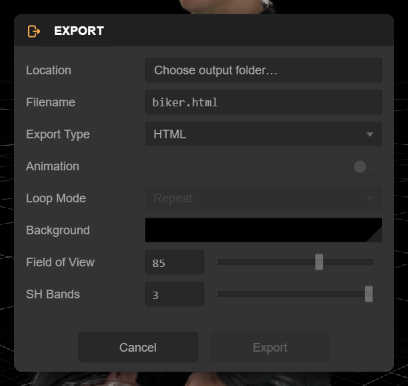
| Option | Description |
|---|---|
| Export Type | Controls the format of the exported viewer: • HTML: A single-page .html file where the splat is compressed to SOG, Base64 encoded and embedded directly into the file. Very convenient since everything is packed into a single file that can be double-clicked to run in your browser using the file:// protocol. However, the base64 encoding means it will be roughly 30% larger than the ZIP Package format, and browsers impose different limits on the maximum size (below 32MB should load everywhere, but above this you could encounter problems)• ZIP Package: A zip file containing the viewer app ( index.html, index.js, index.css and settings.json) plus the splat data as a bundled SOG file (index.sog). Smaller, loads faster and guaranteed to load everywhere. However, it will only load over http://, so you will need to run a local web server (e.g. Node's serve or Python's http.server (python -m http.server)) |
| Animation | If enabled, the camera animation authored on the Timeline is included and plays when the viewer loads. Only available when the Timeline has keyframes (and enabled by default in that case) |
| Loop Mode | How an included camera animation plays back: • None: Play once and stop • Repeat: Loop continuously • Ping Pong: Play forwards, then backwards, repeatedly Initialized from the Timeline's Loop toggle - Repeat if looping is enabled, None otherwise |
| Background | The background color of the viewer. Defaults to the Editor's current background color (set in the Appearance popup) |
| Field of View | The vertical field of view of the viewer's camera in degrees. Defaults to the Editor camera's current setting |
| SH Bands | The number of spherical harmonics bands to include in the exported splat data |
The exported viewer's camera starts at the pose your viewport camera has at the moment you export, so frame your favorite view before exporting.
Web Hosting for the HTML Viewer
Once exported, you can host the HTML Viewer file somewhere to make it accessible. One easy option is to use GitHub Pages:
-
Create a new repository on GitHub.
-
Add the exported HTML file (or, for a ZIP package, the extracted contents of the zip:
index.html,index.sog,index.js,index.cssandsettings.json). -
Visit your repository's
Settingspage. SelectPageson the left. EnsureSourceis set toDeploy from a branchand setBranchtomainand hitSave. -
It will take a few moments for your viewer to be published. The URL will be in the form:
https://<github-username>.github.io/<repository-name>/<html-filename>
See also
- SuperSplat Viewer overview — what the open-source viewer is and when to use it
- Embedding — using the
@playcanvas/supersplat-viewernpm package in your own web app - Experience Settings — the JSON contract Studio writes and the Viewer reads