Collision Shapes
The collision component gives an entity a physical shape. Paired with a rigidbody component it defines the shape of that rigid body; on its own it acts as a trigger volume. The shape does not have to match what the entity looks like, and usually should not: the physics engine tests shapes against each other many times a second, so a simple box or capsule around a detailed model is both faster and more stable than a mesh that follows every polygon.
Shape Types
| Type | Properties | Notes |
|---|---|---|
| Box | Half Extents | The default. Half the width, height and depth of the box, so 0.5, 0.5, 0.5 is a one unit cube |
| Sphere | Radius | |
| Capsule | Radius, Height, Axis | A cylinder with rounded ends and the usual choice for characters. Height is measured tip to tip along the chosen local axis |
| Cylinder | Radius, Height, Axis | |
| Cone | Radius, Height, Axis | |
| Mesh | Model Asset or Render Asset, Convex Hull | The geometry of an asset. See Mesh Colliders below |
| Compound | The shapes of child entities combined into one body. See Compound Shapes below |
Primitive shapes are far cheaper to simulate than meshes, so use the simplest shape that reasonably fits the object. A capsule standing on its Y axis is the standard choice for a character:
- Engine
- Editor
- React
- Web Components
player.addComponent('collision', {
    type: 'capsule',
    radius: 0.5,
    height: 2,
    axis: 1 // 0 = X, 1 = Y (the default), 2 = Z
});
Choose the shape from the Type dropdown of the Collision component. The fields below it change to match: Half Extents for a box, Radius for a sphere, and Radius, Height and Axis for capsules, cylinders and cones.
<Collision type="capsule" radius={0.5} height={2} axis={1} />
If you omit type, the component takes the type of a sibling <Render> primitive, so a render box gets a box collider.
<pc-collision type="capsule" radius="0.5" height="2" axis="1"></pc-collision>
Mesh Colliders
A mesh collider takes its geometry from a model or render asset, usually the same asset the entity renders. It comes in two kinds:
- A triangle mesh, the default, follows the geometry exactly, including any concave parts. It can only be used on static and kinematic bodies and on triggers.
- A convex hull wraps the geometry in the smallest convex shape that contains it. It loses concavities such as the inside of a bowl, but it is the only kind of mesh shape a dynamic body can have.
Building a mesh shape from a large model takes time and memory, so prefer primitives or a compound for anything that moves, and keep triangle meshes for the environment.
- Engine
- Editor
- React
- Web Components
// The environment: a static triangle mesh built from the render asset it draws with
ground.addComponent('collision', {
    type: 'mesh',
    renderAsset: groundAsset
});

// A dynamic prop needs a convex hull
crate.addComponent('collision', {
    type: 'mesh',
    renderAsset: crateAsset,
    convexHull: true
});
Set Type to Mesh and assign either a Model Asset or a Render Asset (render assets are what an imported GLB produces). Tick Convex Hull when the shape belongs to a dynamic body.
Pass a loaded render asset to the renderAsset prop, and set convexHull for a dynamic body:
<Collision type="mesh" renderAsset={crateAsset} convexHull />
There is no attribute for the geometry: type="mesh" uses the mesh of the entity's own <pc-render>, which makes it natural on a <pc-node> inside a loaded model:
<pc-model asset="car">
    <pc-node name="Body">
        <pc-collision type="mesh" convex-hull></pc-collision>
        <pc-rigid-body type="dynamic" mass="1200"></pc-rigid-body>
    </pc-node>
</pc-model>
Offsetting a Shape
Every shape has a Position Offset and a Rotation Offset that move it relative to the entity's origin. A character model whose origin is at its feet, for example, needs its capsule raised by half the capsule's height. Offsets save adding a child entity just to shift a collider.
- Engine
- Editor
- React
- Web Components
// Raise the capsule so that the entity's origin sits at the character's feet
player.addComponent('collision', {
    type: 'capsule',
    radius: 0.5,
    height: 2,
    linearOffset: new pc.Vec3(0, 1, 0)
});

// Tilt a box by 45 degrees about the entity's Y axis
crate.collision.angularOffset = new pc.Quat().setFromEulerAngles(0, 45, 0);
Set Position Offset and Rotation Offset (in degrees) on the Collision component. Both are available for every shape type.
<Collision type="capsule" radius={0.5} height={2} linearOffset={[0, 1, 0]} angularOffset={[0, 45, 0]} />
<pc-collision type="capsule" radius="0.5" height="2" linear-offset="0 1 0" angular-offset="0 45 0"></pc-collision>
Compound Shapes
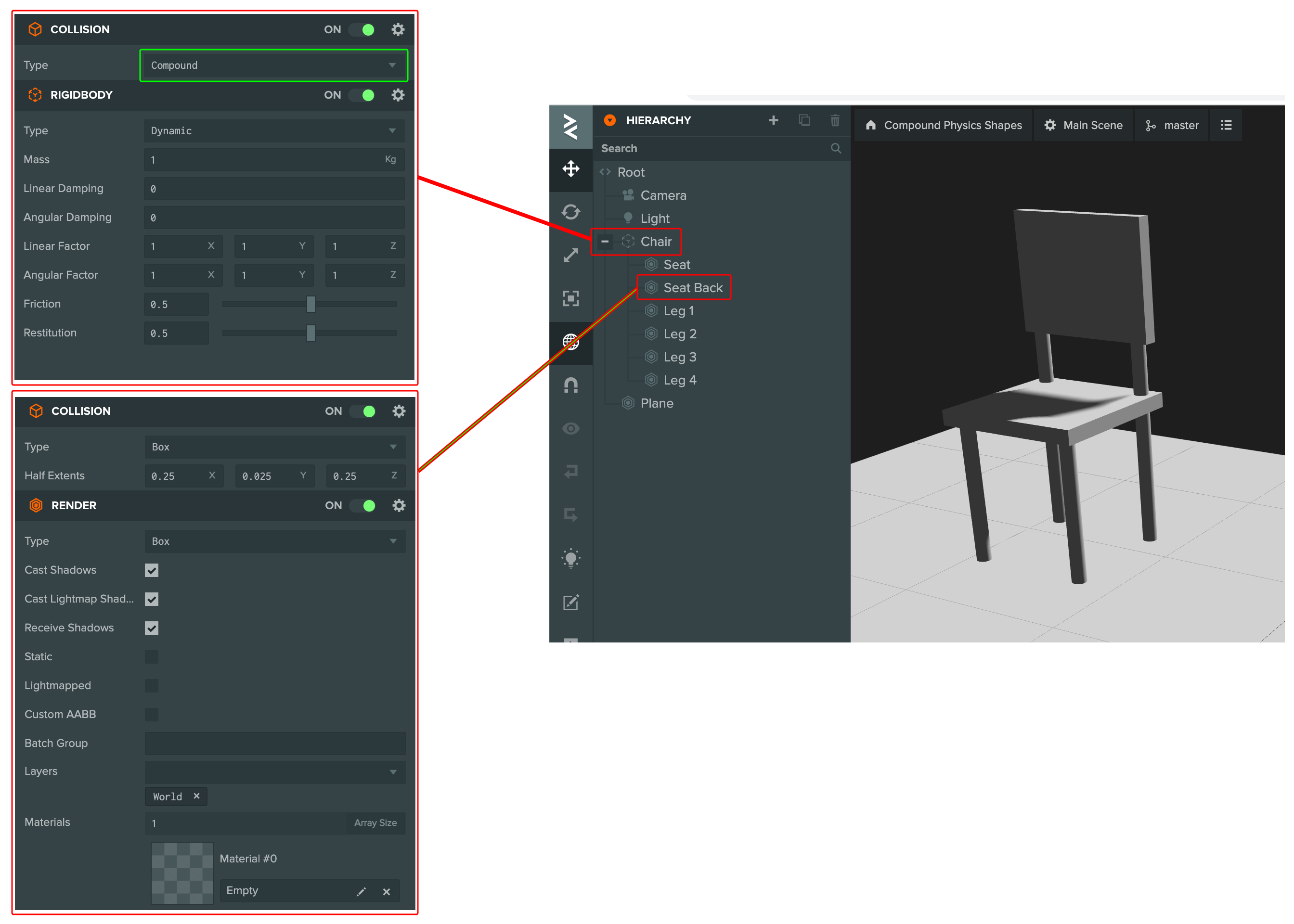
A compound shape combines the collision shapes of an entity's children into a single body. It gives a dynamic body a complex outline without a mesh collider: a chair can be a seat, a back and four legs, all boxes, and still collide with other dynamic bodies, which a concave mesh cannot do. Compounds are also far cheaper to simulate than mesh shapes.
The parent carries a collision component of type Compound together with the rigidbody component. Each child carries a collision component with a primitive shape, positioned and rotated relative to the parent. The children need no rigidbody components of their own; the parent's body owns the whole shape. A descendant that does have its own rigidbody component is treated as a separate body and left out of the compound.
- Engine
- Editor
- React
- Web Components
// The parent owns the body and combines the children's shapes
const chair = new pc.Entity('chair');
chair.addComponent('collision', { type: 'compound' });
chair.addComponent('rigidbody', { type: pc.BODYTYPE_DYNAMIC, mass: 5 });

// Children carry the shapes, positioned relative to the parent, and need no rigidbody
const seat = new pc.Entity('seat');
seat.addComponent('collision', { type: 'box', halfExtents: new pc.Vec3(0.25, 0.025, 0.25) });
seat.setLocalPosition(0, 0.45, 0);
chair.addChild(seat);
Give the parent a Collision component with Type set to Compound and a Rigid Body component. Add a child entity for each part, with a Collision component of a primitive type and its position and rotation set relative to the parent:
<Entity name="chair">
  <Collision type="compound" />
  <RigidBody type="dynamic" mass={5} />
  <Entity name="seat" position={[0, 0.45, 0]}>
    <Collision type="box" halfExtents={[0.25, 0.025, 0.25]} />
  </Entity>
</Entity>
<pc-entity name="chair">
    <pc-collision type="compound"></pc-collision>
    <pc-rigid-body type="dynamic" mass="5"></pc-rigid-body>
    <pc-entity name="seat" position="0 0.45 0">
        <pc-collision type="box" half-extents="0.25 0.025 0.25"></pc-collision>
    </pc-entity>
</pc-entity>
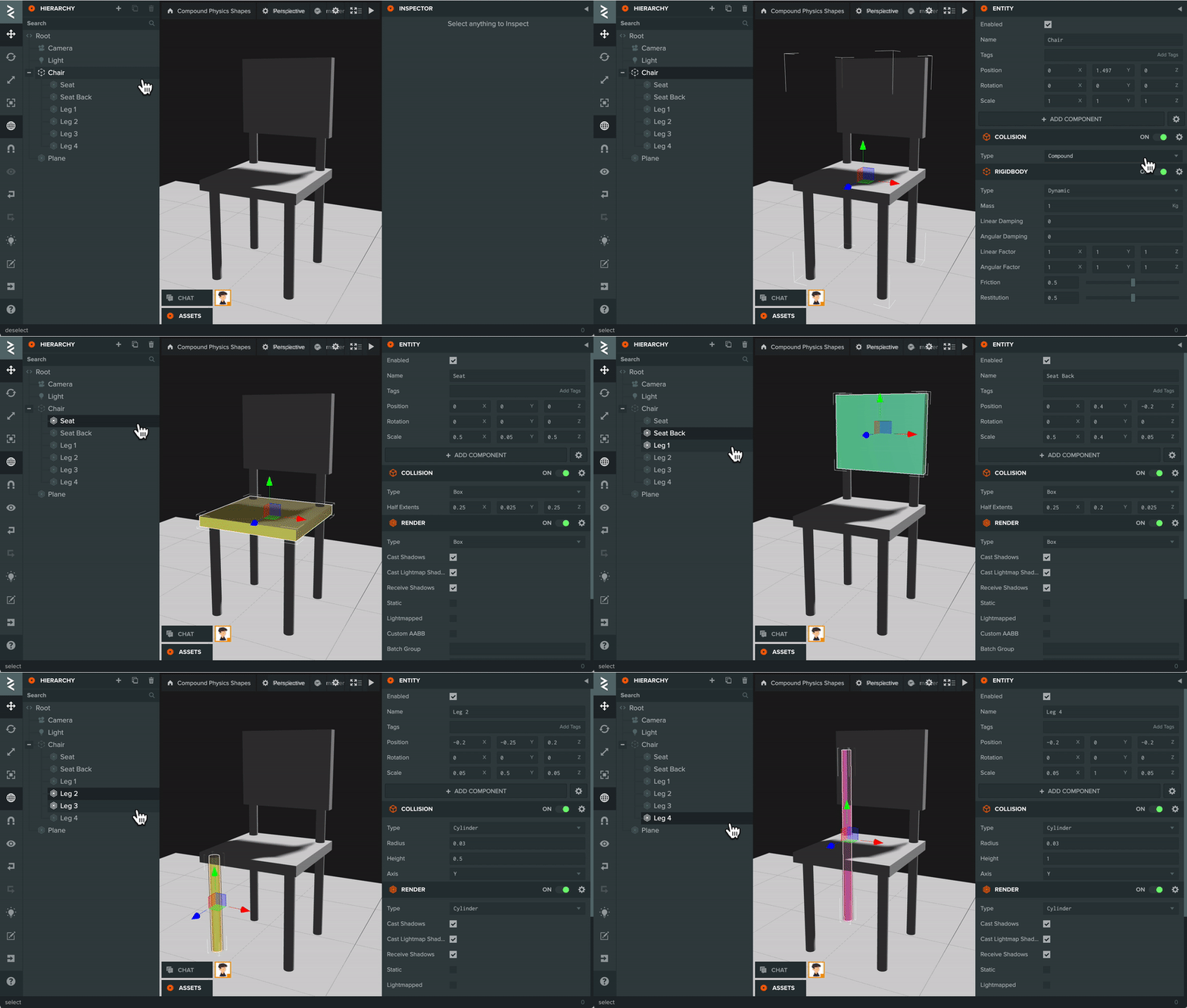
Children can be moved at runtime. When a child's transform changes, the engine updates that shape's offset within the compound and wakes the parent body. The parent entity is also the body's center of mass, so keep it within the bounds of the shape (usually its center); otherwise the body may behave oddly when forces and torque are applied, such as rotating around an invisible pivot.
The chair above comes from the Compound Physics Shapes tutorial project.
Scale
Primitive shapes ignore the entity's scale. A box collider is always its half extents in world units, so scaling an entity up does not enlarge its collider; change the half extents or radius instead. Mesh shapes are the exception: they follow the world scale of the entity, or of the model node, that they are built from. Children of a compound are placed by their local position and rotation relative to the parent.
Visualizing Shapes
The Editor outlines the collision shape of the selected entity in the viewport, which is the quickest way to check a shape's size and offset. To see every shape while an application runs, on any surface, add the engine's render-physics.js script to an entity and enable its Draw Shapes attribute. It draws each collision shape in the scene as a translucent mesh.
See Also
- Rigid Bodies - The body a shape belongs to
- Trigger Volumes - Shapes without a body
- Collision Component - Editor reference for every property
- CollisionComponent - API reference
- Compound Physics Shapes - Tutorial project for the chair shown above