Fisheye Rendering
PlayCanvas supports a fisheye (barrel distortion) projection for Gaussian splats and the infinite skybox. This lets you render ultra-wide fields of view, immersive 360° views, and stylized "tiny planet" effects, all while keeping regular meshes and UI rendering with the standard rectilinear projection.
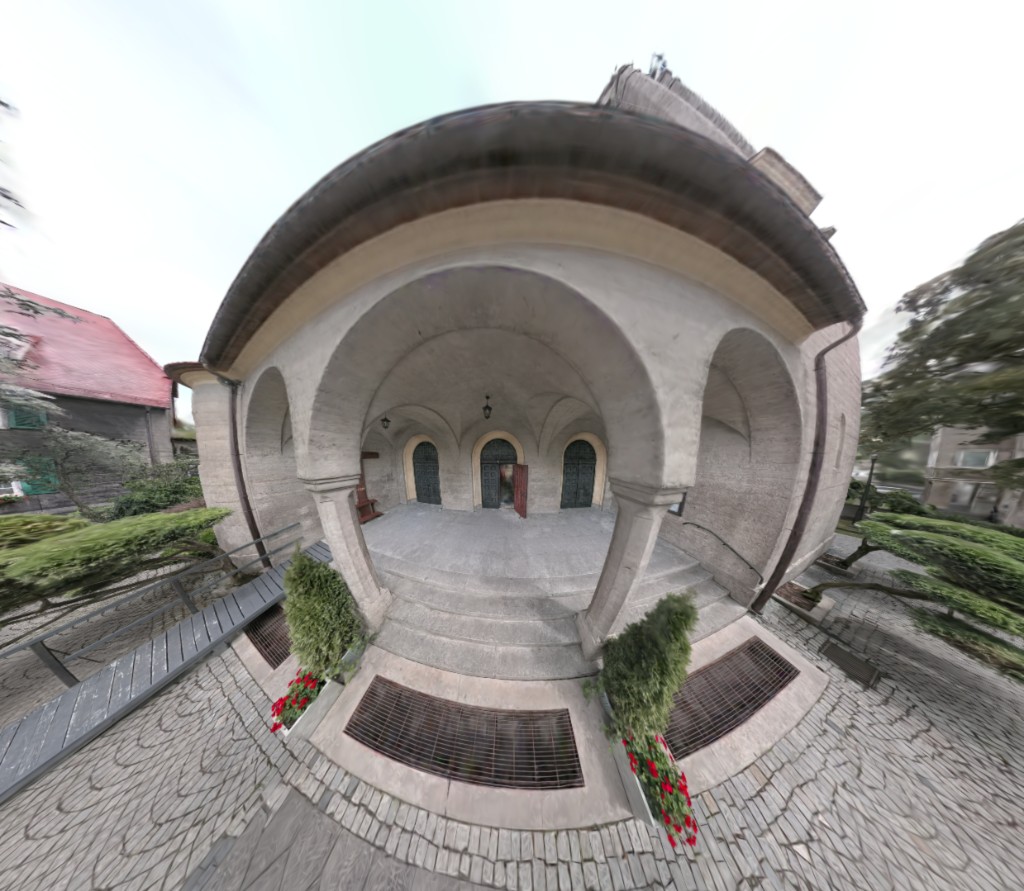
View Live Example - Open the Settings panel and drag the fisheye slider from 0 to 1. Try combining it with higher cameraFov values and different HDRI environments to reproduce the skydome and tiny-planet looks.
What Is It?
The effect is controlled by two simple [0, 1] sliders:
Scene.gsplat.fisheye— distorts the Gaussian splat rendering.Sky.fisheye— distorts the infinite skybox.
At 0 the image is a standard perspective view. As the value increases, more barrel distortion is applied, widening the effective field of view. Setting both sliders to the same value produces a seamless wide-angle look where the splats and the sky share the same projection.
Fisheye only affects Gaussian splats and the infinite sky. Other objects in the scene (meshes, sprites, UI, etc.) continue to use the camera's standard perspective projection and are not distorted. Applying fisheye distortion to regular meshes is not currently supported.
In practice, this means fisheye is best used in scenes that are predominantly splats plus the sky. Mixing regular meshes into a fisheye view will show a visible mismatch between the undistorted meshes and the distorted splats, and they will not line up geometrically.
Requirements and Limitations
- Perspective camera only: Has no effect with orthographic projection.
- Skybox:
Sky.fisheyeonly applies toSKYTYPE_INFINITEskies. It has no effect on dome or box sky types. - First-time shader compilation: The first time you enable fisheye, a new shader variant is compiled (small one-off cost). Switching between
0and non-zero values afterwards is instantaneous. - Sorting: For best results, enable
Scene.gsplat.radialSortingwhen using fisheye. With very wide fields of view, the default depth sort can produce visible artifacts which radial sorting avoids.
Basic Usage
Enable fisheye on both the splats and the sky so they match:
// Apply a moderate fisheye effect (0 = off, 1 = maximum distortion)
app.scene.gsplat.fisheye = 0.5;
app.scene.sky.fisheye = 0.5;

// Recommended when using fisheye to avoid splat sorting artifacts
app.scene.gsplat.radialSorting = true;
To disable it, set both back to 0:
app.scene.gsplat.fisheye = 0;
app.scene.sky.fisheye = 0;
Effect Recipes
Ultra-wide Field of View
A small amount of fisheye combined with a high camera FOV gives a natural-looking wide-angle lens, useful for action cameras, VR-style previews, or cinematic indoor shots where a standard perspective camera would feel too narrow.
camera.camera.fov = 120;
app.scene.gsplat.fisheye = 0.3;
app.scene.sky.fisheye = 0.3;
Fisheye Skydome
Push the fisheye value higher to turn the infinite skybox into a domed projection, great for environmental previews and HDRI inspection.
camera.camera.fov = 140;
app.scene.gsplat.fisheye = 0.8;
app.scene.sky.fisheye = 0.8;
Tiny Planet
With fisheye = 1 and a wide FOV, the projection wraps tightly enough to produce the classic "tiny planet" look when the camera is tilted downward.
camera.camera.fov = 320;
app.scene.gsplat.fisheye = 1;
app.scene.sky.fisheye = 1;