Entities
An entity is an object in your scene. It has a name, a position, rotation and scale, a parent and any number of children, and it gains abilities from the components attached to it. This page follows an entity through its life: creating it, finding a name and tags for it, switching it off and on, destroying it, and making copies of it.
Creating an Entity
An entity becomes part of the scene when it is added to the scene's tree of entities, whose root is app.root. Until then it is not drawn, its scripts do not run and its physics body, if it has one, is not simulated. Every entity can be the parent of others, so you can add a new entity to app.root or to any entity already in the scene.
- Engine
- Editor
- React
- Web Components
const player = new pc.Entity('player');
app.root.addChild(player);

// a child of the player
const hat = new pc.Entity('hat');
player.addChild(hat);
In a script, the root is this.app.root, and this.entity is the entity that the script is attached to.
Click + at the top of the Hierarchy, or right-click an entity and choose New Entity. The menu offers an empty Entity and ready-made ones, such as 3D › Box and Light › Spot Light, that already have the components their names say. A new entity is added as a child of the selected entity, so select its parent first. Press Ctrl+E (Cmd+E on Mac) to add an empty entity without the menu.
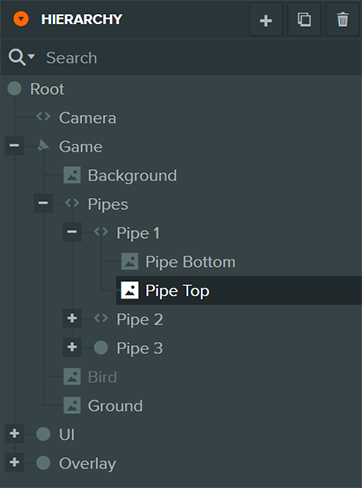
To create entities while the application runs, use the Engine API from a script.
import { Entity } from '@playcanvas/react';

<Entity name="player">
  <Entity name="hat" />
</Entity>
Rendering an <Entity> creates an engine entity and adds it to the entity of the nearest enclosing <Entity>, or to app.root at the top level of the <Application>.
<pc-scene>
    <pc-entity name="player">
        <pc-entity name="hat"></pc-entity>
    </pc-entity>
</pc-scene>
Each <pc-entity> creates an engine entity and adds it to the entity of the enclosing <pc-entity>, or to app.root directly inside the <pc-scene>. A <pc-entity> that you append at runtime is created as soon as it joins the document:
const hat = document.createElement('pc-entity');
hat.setAttribute('name', 'hat');
document.querySelector('pc-entity[name="player"]').appendChild(hat);
Names and Tags
An entity's name identifies it for you. It shows in the Editor's Hierarchy, and you can look an entity up by it. Names do not have to be unique; an entity created without one is called Untitled.
Tags are labels for groups of entities. An entity can have any number of them, and many entities can share one, so you can tag every enemy enemy and find them all at once. See Finding Entities.
- Engine
- Editor
- React
- Web Components
const enemy = new pc.Entity('goblin');
enemy.tags.add('enemy', 'melee');

enemy.name = 'goblin chief';
enemy.tags.remove('melee');
console.log(enemy.tags.list()); // ['enemy']
Set an entity's Name and Tags at the top of the Inspector. You can also rename the selected entity by pressing F2, or by double-clicking it in the Hierarchy.
<Entity> takes a name prop. Add tags to the engine entity through a ref:
import { useEffect, useRef } from 'react';
import { Entity } from '@playcanvas/react';

function Goblin() {
  const ref = useRef(null);

  useEffect(() => {
    ref.current.tags.add('enemy', 'melee');
  }, []);

  return <Entity ref={ref} name="goblin" />;
}
<pc-entity name="goblin" tags="enemy, melee"></pc-entity>
The tags attribute is a comma-separated list.
Enabling and Disabling
A disabled entity is switched off, together with everything below it in the hierarchy. Its components stop: it is not drawn, its scripts' update methods are not called, and its physics body leaves the simulation. They keep their settings, though, so enabling the entity again switches it back on as it was. Disable entities that you will need again, such as a menu that comes and goes, rather than destroying and recreating them.
An entity's enabled property reports whether it is actually on, so it reads false while any of its ancestors is disabled, and for an entity that has not been added to the scene yet. Setting enabled to true under a disabled parent is remembered, and takes effect when the parent is enabled again.
- Engine
- Editor
- React
- Web Components
door.enabled = false; // the door and all of its children switch off
door.enabled = true;  // and back on
Uncheck Enabled at the top of the Inspector, or right-click entities in the Hierarchy and choose Disable. The Hierarchy shows disabled entities grayed out. To change it at runtime, set this.entity.enabled from a script.
Hide in the same menu is different: it hides the entity in your own viewport for the rest of the session, without changing the scene or the launched application.
<Entity> has no enabled prop. Stop rendering an entity to remove it, which destroys it; rendering it again creates a new one. To switch an entity off and keep it as it is, set enabled on the engine entity through a ref:
import { useEffect, useRef } from 'react';
import { Entity } from '@playcanvas/react';
import { Render } from '@playcanvas/react/components';

function Door({ open }) {
  const ref = useRef(null);

  useEffect(() => {
    ref.current.enabled = !open;
  }, [open]);

  return (
    <Entity ref={ref} name="door">
      <Render type="box" />
    </Entity>
  );
}
<pc-entity name="door" enabled="false">
    <pc-render type="box"></pc-render>
</pc-entity>
Change it at runtime with door.setAttribute('enabled', 'true'), or through the element's enabled property. That property reports the element's own setting, so it can read true while a parent entity is disabled.
Destroying an Entity
Destroying an entity removes it from its parent, removes all of its components and destroys all of its descendants with it. Each entity fires a destroy event as it goes, the deepest descendants first. A destroyed entity cannot be used again, so drop any references you hold to it.
Removing an entity from its parent with removeChild() is not the same thing, and does not switch it off. A detached entity stops being drawn, but its scripts keep running and its lights keep lighting the scene. To take an entity out of action, disable it. To get rid of it, destroy it.
- Engine
- Editor
- React
- Web Components
enemy.once('destroy', () => {
    console.log('enemy destroyed');
});
enemy.destroy();
Select entities and press Delete, click the delete button at the top of the Hierarchy, or right-click and choose Delete. To destroy an entity at runtime, call destroy() on it from a script, for example this.entity.destroy().
Stop rendering the <Entity>. When it unmounts, its engine entity is destroyed together with everything inside it:
{alive && (
  <Entity name="enemy">
    <Render type="sphere" />
  </Entity>
)}
Remove the element. Its entity is destroyed together with the entities of every <pc-entity> inside it:
document.querySelector('pc-entity[name="enemy"]').remove();
Copying an Entity
clone() makes a deep copy of an entity: its name, tags, transform and enabled state, its components with their settings, and copies of all of its descendants. The copy is not in the scene until you add it. References between entities inside the copied tree are updated to point at the copies, so a button's image entity, for example, is the copy's own image.
The scripts of a copy are new instances, which initialize when the copy joins the scene. Each one starts with the attribute values that the original script was created with, such as the ones set in the Editor, not with the current values of the original's fields.
For objects you place many times, such as trees, pickups and enemies, the Editor has templates: entity trees saved as assets, which you can place in scenes and also create at runtime.
- Engine
- Editor
- React
- Web Components
const copy = enemy.clone();
copy.setPosition(5, 0, 0);
app.root.addChild(copy);
A copy can only get the scripts that are registered with the application. A script attached by class with entity.script.create(MyScript) is not registered automatically, so register it first, or the copy has no instance of it:
app.scripts.add(MyScript);
To copy entities in the scene, select them and press Ctrl+D (Cmd+D on Mac), or right-click and choose Duplicate. Each copy is placed next to its original.
At runtime, call clone() on an entity in the scene, or create an instance of a template asset. A template needs to be loaded before you instantiate it, so mark its asset to preload, or load it first:
import { Asset, Script } from 'playcanvas';

export class Spawner extends Script {
    static scriptName = 'spawner';

    /**
     * The template to spawn.
     *
     * @attribute
     * @type {Asset}
     * @resource template
     */
    template;

    spawn() {
        const instance = this.template.resource.instantiate();
        instance.setPosition(0, 2, 0);
        this.app.root.addChild(instance);
    }
}
There is no need to copy entities: render the same component again. To create one entity for each item of your data, map over it, giving each <Entity> a stable key:
{enemies.map(enemy => (
  <Entity key={enemy.id} name="enemy" position={enemy.position}>
    <Render type="sphere" />
  </Entity>
))}
Copy the element. Cloning a <pc-entity> element copies its markup, so the copy is created from its attributes and child tags, not from the current state of the original's entity:
const enemy = document.querySelector('pc-entity[name="enemy"]');
const copy = enemy.cloneNode(true);
copy.setAttribute('position', '5 0 0');
enemy.parentElement.appendChild(copy);
To declare a subtree once and stamp out copies of it, put it in a native <template> element. See Reusable Scenes with Templates.
Example
This Engine app uses everything on this page. It builds one cube with a script that throws the cube up and destroys it once it falls out of view, and keeps that cube out of the scene as a template. Every frame, it adds copies of the template to a fountain entity. Click the canvas to disable the fountain: every cube in it disappears and freezes, because disabling an entity switches off its descendants. Click again, and they carry on from where they were.
import * as pc from 'playcanvas';

// create the application with the component systems it uses
const canvas = document.getElementById('application');
const device = await pc.createGraphicsDevice(canvas, {
    deviceTypes: [pc.DEVICETYPE_WEBGPU]
});
device.maxPixelRatio = Math.min(window.devicePixelRatio, 2);

const options = new pc.AppOptions();
options.graphicsDevice = device;
options.componentSystems = [
    pc.RenderComponentSystem,
    pc.CameraComponentSystem,
    pc.LightComponentSystem,
    pc.ScriptComponentSystem
];

const app = new pc.AppBase(canvas);
app.init(options);
app.setCanvasFillMode(pc.FILLMODE_FILL_WINDOW);
app.setCanvasResolution(pc.RESOLUTION_AUTO);
window.addEventListener('resize', () => app.resizeCanvas());
app.start();

app.scene.ambientLight = new pc.Color(0.3, 0.3, 0.35);

const camera = new pc.Entity('camera');
camera.addComponent('camera', {
    clearColor: new pc.Color(0.11, 0.12, 0.17)
});
camera.setPosition(0, 3, 14);
camera.lookAt(0, 3, 0);
app.root.addChild(camera);

const light = new pc.Entity('light');
light.addComponent('light');
light.setEulerAngles(45, 30, 0);
app.root.addChild(light);

// three materials for the cubes to pick from
const materials = [
    new pc.Color(1, 0.55, 0.2),
    new pc.Color(0.4, 0.2, 1),
    new pc.Color(0.2, 0.8, 0.6)
].map((color) => {
    const material = new pc.StandardMaterial();
    material.diffuse = color;
    material.update();
    return material;
});

// a script that throws its entity up, and destroys it once it falls out of view
class Fall extends pc.Script {
    static scriptName = 'fall';

    velocity = new pc.Vec3();

    initialize() {
        this.velocity.set(pc.math.random(-2, 2), pc.math.random(8, 11), pc.math.random(-2, 2));
        this.entity.render.material = materials[Math.floor(Math.random() * materials.length)];
    }

    update(dt) {
        this.velocity.y -= 9.8 * dt;
        this.entity.translate(this.velocity.x * dt, this.velocity.y * dt, this.velocity.z * dt);
        this.entity.rotateLocal(120 * dt, 80 * dt, 0);
        if (this.entity.getPosition().y < -4) {
            this.entity.destroy();
        }
    }
}

// clone() can only copy scripts that are registered with the application
app.scripts.add(Fall);

// the template is never added to the scene, so it is never drawn and its script never runs
const template = new pc.Entity('cube');
template.addComponent('render', { type: 'box' });
template.addComponent('script');
template.script.create(Fall);
template.setLocalScale(0.3, 0.3, 0.3);

// the fountain holds every cube, so disabling it disables them all
const fountain = new pc.Entity('fountain');
app.root.addChild(fountain);

const label = document.createElement('div');
label.style.cssText = 'position: absolute; left: 12px; bottom: 10px; color: #ccc; font: 14px sans-serif;';
document.body.appendChild(label);

// every frame, while the fountain is enabled, add copies of the template to it
let timer = 0;
app.on('update', (dt) => {
    if (fountain.enabled) {
        timer += dt;
        while (timer > 0.05) {
            timer -= 0.05;
            fountain.addChild(template.clone());
        }
    }
    label.textContent = `Cubes: ${fountain.children.length}. Click to ${fountain.enabled ? 'disable' : 'enable'} the fountain.`;
});

// disable and enable the fountain, and with it every cube
canvas.addEventListener('click', () => {
    fountain.enabled = !fountain.enabled;
});
Some things to try:
- Make the fountain spray faster by lowering the
0.05in both places it appears. - Scale the fountain up with
fountain.setLocalScale(2, 2, 2). Its cubes are its children, so they are drawn twice as large. They still fly the same paths, though, becausetranslate()moves an entity in world space. - Delete the
app.scripts.add(Fall)line. The copies then have no script, so they pile up in the middle, uncolored, and are never destroyed.
See Also
- Components - Giving entities their abilities
- Hierarchy and Transforms - Parents, children, and positioning entities
- Templates - Reusable entity trees in the Editor
- Hierarchy Panel - Creating, duplicating and organizing entities in the Editor
<Entity/>and<pc-entity>- The React and Web Components entity references- Entity and GraphNode - The engine API reference