Positional Audio
A positional sound is heard from where its entity is. As the entity moves relative to the audio listener, the sound moves between the speakers and fades with distance. This is the default for every sound component, so an entity with a sound component is already a point in space that makes noise. This page covers where sounds are heard from, how they fade, and when to turn positioning off.
Positional and Non-Positional Sounds
The sound component's positional property is true by default. It applies to every slot of the component.
- Positional sounds suit anything that is somewhere in the world: footsteps, engines, voices, a waterfall.
- Non-positional sounds play at the same volume in both speakers, wherever the entity and the listener are. Turn
positionaloff for music, interface sounds and narration.
A component is one or the other. For an entity that needs both, such as a player with footsteps in the world and a heartbeat in the head, put the non-positional sounds on a second sound component, on a child entity.
The Audio Listener
Positional sounds are heard from the entity that has the audio listener component: its position is where the ears are, and its rotation is which way they face. Put it on the camera, and sounds match what you see.
- Engine
- Editor
- React
- Web Components
Register AudioListenerComponentSystem with your application, then add the component to the camera. It has no settings:
camera.addComponent('audiolistener');
Select the camera entity, click Add Component and choose Audio Listener. The component has no settings.
Add the engine component from a small component of your own, inside the camera's <Entity>:
import { useEffect } from 'react';
import { useParent } from '@playcanvas/react/hooks';

function AudioListener() {
  const entity = useParent();

  useEffect(() => {
    entity.addComponent('audiolistener');
    return () => entity.removeComponent('audiolistener');
  }, [entity]);

  return null;
}
<Entity name="camera" position={[0, 2, 8]}>
  <Camera />
  <AudioListener />
</Entity>
Put a <pc-audio-listener> inside the camera's entity:
<pc-entity name="camera" position="0 2 8">
    <pc-camera></pc-camera>
    <pc-audio-listener></pc-audio-listener>
</pc-entity>
Only one listener is in use at a time:
- The listener that was enabled most recently is the one in use. Adding a second listener takes over from the first.
- Disabling the listener in use does not hand over to another one. Sounds go on being heard from where it last was, until a listener is enabled again. To switch between two listeners, disable one and then enable the other, in that order.
- With no listener at all, sounds are heard from the world origin, facing down the negative Z axis.
The Camera or the Character
In a first-person game, the camera is the character, and the listener belongs on it. In a third-person game, you have a choice. A listener on the camera matches the picture: a sound on the left of the screen is on the left. A listener on the character matches the game: the footsteps of an enemy creeping up behind the character are loud, however far away the camera is. A common compromise is to put the listener on an entity that takes its position from the character and its rotation from the camera.
Distance
Four properties of the sound component set how a positional sound fades with its distance from the listener. They apply to every slot of the component.
| Property | Default | Description |
|---|---|---|
distanceModel | DISTANCE_LINEAR | The shape of the fade: DISTANCE_LINEAR, DISTANCE_INVERSE or DISTANCE_EXPONENTIAL |
refDistance | 1 | The distance within which the sound plays at full volume. The fade starts here |
maxDistance | 10000 | With the linear model, the distance at which the fade ends. The other models ignore it |
rollOffFactor | 1 | How steep the fade is. Higher values fade the sound over a shorter distance |
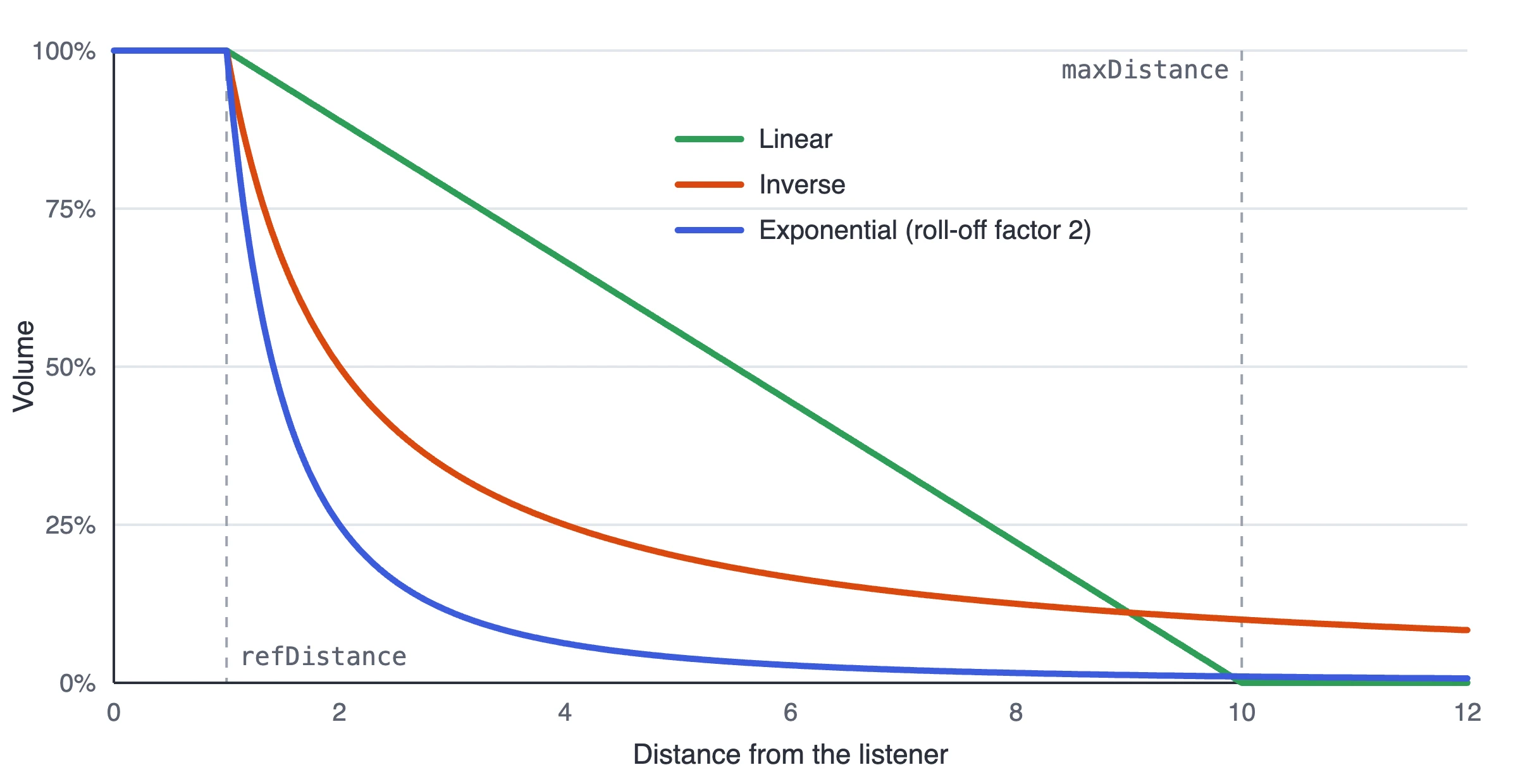
The chart shows each model with a refDistance of 1, and the linear model with a maxDistance of 10.
The three models fade a sound in different ways:
- Linear fades evenly from full volume at
refDistanceto silence atmaxDistance. It is the easiest to reason about, and the only model with a hard edge beyond which a sound is silent. ArollOffFactorbelow 1 stops the fade short of silence: at 0.5, the sound falls to half volume atmaxDistanceand stays there. - Inverse fades the way sound does in open air. With a
rollOffFactorof 1, the volume halves each time the distance from the listener doubles, so a sound is loud close by, falls away quickly, and then lingers in the distance without ever reaching silence. - Exponential is the same as inverse with a
rollOffFactorof 1, but steeper asrollOffFactorrises. With arollOffFactorof 2, the volume falls to a quarter each time the distance doubles.
The defaults do not suit most scenes. A linear fade over 10,000 units is so gradual that a sound 100 units away still plays at 99% of its volume: sounds move between the speakers, but never seem to get quieter. Set maxDistance to the distance at which the sound should be silent, or choose the inverse model.
- Engine
- Editor
- React
- Web Components
entity.addComponent('sound', {
    distanceModel: DISTANCE_LINEAR,
    refDistance: 1,
    maxDistance: 20
});

// or change them at any time, while sounds play
entity.sound.distanceModel = DISTANCE_INVERSE;
entity.sound.refDistance = 2;
With Positional turned on, the Sound component shows Ref Distance, Max Distance, Distance Model and Roll-off Factor.
The <Sound> component from the Getting Started page adds a sound component with default settings. To choose the settings, add the component first, from a wrapper that passes its props to the engine component:
import { useEffect, useState } from 'react';
import { useParent } from '@playcanvas/react/hooks';

function SoundSource({ children, ...settings }) {
  const entity = useParent();
  const [ready, setReady] = useState(false);

  useEffect(() => {
    entity.addComponent('sound', settings);
    setReady(true);
    return () => {
      entity.removeComponent('sound');
      setReady(false);
    };
  }, [entity]);

  return ready ? children : null;
}
<Entity name="radio" position={[4, 0, 0]}>
  <SoundSource positional distanceModel="linear" maxDistance={20}>
    <Sound name="music" src="https://developer.playcanvas.com/assets/music.mp3" loop autoPlay />
  </SoundSource>
</Entity>
<pc-entity name="radio" position="4 0 0">
    <pc-sound distance-model="linear" ref-distance="1" max-distance="20">
        <pc-sound-slot name="music" asset="music" loop auto-play></pc-sound-slot>
    </pc-sound>
</pc-entity>
Panning
The direction of a sound from the listener decides how it is shared between the left and right speakers. A sound straight ahead plays equally in both, and a sound directly to one side plays in that speaker only.
Panning is left and right only. A sound behind the listener sounds the same as one in front, and height makes no difference. The engine does not simulate the Doppler effect either: a sound keeps its pitch however fast it moves.
Positions are updated every frame, so sounds follow moving entities and a moving listener with no work from you.
Example
This Engine app plays music from a red sphere that circles a listener, the yellow capsule. The inner ring is the refDistance and the outer ring is the maxDistance. Click Play, and put headphones on to hear the panning.
import {
    AppBase,
    AppOptions,
    Asset,
    AudioHandler,
    AudioListenerComponentSystem,
    CameraComponentSystem,
    Color,
    createGraphicsDevice,
    DEVICETYPE_WEBGPU,
    Entity,
    FILLMODE_FILL_WINDOW,
    LightComponentSystem,
    RenderComponentSystem,
    RESOLUTION_AUTO,
    SoundComponentSystem,
    SoundManager,
    StandardMaterial,
    Vec3
} from 'playcanvas';

// create the application with the component systems and resource handlers it uses
const canvas = document.getElementById('application');
const device = await createGraphicsDevice(canvas, {
    deviceTypes: [DEVICETYPE_WEBGPU]
});
device.maxPixelRatio = Math.min(window.devicePixelRatio, 2);

const options = new AppOptions();
options.graphicsDevice = device;
options.soundManager = new SoundManager();
options.componentSystems = [
    RenderComponentSystem,
    CameraComponentSystem,
    LightComponentSystem,
    SoundComponentSystem,
    AudioListenerComponentSystem
];
options.resourceHandlers = [AudioHandler];

const app = new AppBase(canvas);
app.init(options);
app.setCanvasFillMode(FILLMODE_FILL_WINDOW);
app.setCanvasResolution(RESOLUTION_AUTO);
window.addEventListener('resize', () => app.resizeCanvas());
app.start();

app.scene.ambientLight = new Color(0.35, 0.35, 0.4);

const asset = new Asset('music', 'audio', {
    url: 'https://developer.playcanvas.com/assets/music.mp3'
});
await new Promise((resolve) => {
    asset.ready(resolve);
    app.assets.add(asset);
    app.assets.load(asset);
});

const createMaterial = (color) => {
    const material = new StandardMaterial();
    material.diffuse = color;
    material.update();
    return material;
};

// the camera looks down on the scene, so it is not where the sound is heard from
const camera = new Entity('camera');
camera.addComponent('camera', {
    clearColor: new Color(0.11, 0.12, 0.17)
});
camera.setPosition(0, 20, 11);
camera.lookAt(0, 0, 1.5);
app.root.addChild(camera);

const light = new Entity('light');
light.addComponent('light');
light.setEulerAngles(48, 38, 0);
app.root.addChild(light);

const floor = new Entity('floor');
floor.addComponent('render', { type: 'plane', material: createMaterial(new Color(0.24, 0.26, 0.31)) });
floor.setLocalScale(40, 1, 40);
app.root.addChild(floor);

// the listener: sounds are heard from here, facing away from the camera
const listener = new Entity('listener');
listener.addComponent('render', { type: 'capsule', material: createMaterial(new Color(0.95, 0.75, 0.2)) });
listener.addComponent('audiolistener');
listener.setPosition(0, 1, 0);
app.root.addChild(listener);

// the sound source: a positional sound component
const radio = new Entity('radio');
radio.addComponent('render', { type: 'sphere', material: createMaterial(new Color(0.9, 0.3, 0.35)) });
radio.addComponent('sound', {
    positional: true,
    distanceModel: 'linear',
    refDistance: 1,
    maxDistance: 10,
    rollOffFactor: 1
});
radio.sound.addSlot('music', { asset: asset.id, loop: true });
app.root.addChild(radio);

// the volume that each distance model gives at a distance
const volumeAt = (distance) => {
    const { distanceModel, refDistance, maxDistance, rollOffFactor } = radio.sound;
    const d = Math.max(distance, refDistance);
    if (distanceModel === 'linear') {
        const rollOff = Math.min(rollOffFactor, 1);
        return 1 - rollOff * (Math.min(d, maxDistance) - refDistance) / (maxDistance - refDistance);
    }
    if (distanceModel === 'inverse') {
        return refDistance / (refDistance + rollOffFactor * (d - refDistance));
    }
    return Math.pow(d / refDistance, -rollOffFactor);
};

// controls
const panel = document.createElement('div');
panel.style.cssText = 'position: absolute; left: 12px; top: 12px; right: 12px; display: flex; flex-wrap: wrap; gap: 8px 14px; align-items: center; color: #ccc; font: 14px sans-serif;';
document.body.appendChild(panel);

const playButton = document.createElement('button');
playButton.textContent = 'Play';
playButton.onclick = () => {
    const slot = radio.sound.slot('music');
    if (slot.isPlaying) {
        slot.stop();
    } else {
        slot.play();
    }
    playButton.textContent = slot.isPlaying ? 'Stop' : 'Play';
};
panel.appendChild(playButton);

const modelLabel = document.createElement('label');
const model = document.createElement('select');
for (const name of ['linear', 'inverse', 'exponential']) {
    model.add(new Option(name));
}
model.onchange = () => {
    radio.sound.distanceModel = model.value;
};
modelLabel.append('Model ', model);
panel.appendChild(modelLabel);

const addSlider = (text, property, min, max) => {
    const label = document.createElement('label');
    const input = document.createElement('input');
    Object.assign(input, { type: 'range', min, max, step: 0.5, value: radio.sound[property] });
    input.style.width = '90px';
    input.oninput = () => {
        radio.sound[property] = Number(input.value);
    };
    label.append(`${text} `, input);
    panel.appendChild(label);
};
addSlider('Ref', 'refDistance', 0.5, 5);
addSlider('Max', 'maxDistance', 6, 12);
addSlider('Roll-off', 'rollOffFactor', 0, 3);

const status = document.createElement('div');
status.style.cssText = 'position: absolute; left: 12px; bottom: 10px; color: #ccc; font: 14px sans-serif;';
document.body.appendChild(status);

// draw a ring on the floor around the listener
const drawRing = (radius, color) => {
    const center = listener.getPosition();
    const steps = 64;
    for (let i = 0; i < steps; i++) {
        const a = (i / steps) * Math.PI * 2;
        const b = ((i + 1) / steps) * Math.PI * 2;
        app.drawLine(
            new Vec3(center.x + Math.cos(a) * radius, 0.02, center.z + Math.sin(a) * radius),
            new Vec3(center.x + Math.cos(b) * radius, 0.02, center.z + Math.sin(b) * radius),
            color
        );
    }
};

let angle = 0;
app.on('update', (dt) => {
    // carry the radio around the listener, passing close by on one side
    angle += dt * 0.5;
    radio.setPosition(Math.cos(angle) * 7 + 3, 0.5, Math.sin(angle) * 5);

    drawRing(radio.sound.refDistance, Color.WHITE);
    drawRing(radio.sound.maxDistance, Color.GRAY);

    const distance = radio.getPosition().distance(listener.getPosition());
    status.textContent = `Distance: ${distance.toFixed(1)}   Volume: ${Math.round(volumeAt(distance) * 100)}%`;
});
Some things to try:
- Switch the model to inverse. The outer ring no longer means anything: the sound is audible everywhere, and quickly gets louder as the radio comes close.
- Drag Roll-off to 0 to switch the fade off, and to 3 with the exponential model to make the sound drop away steeply.
- Delete the line
listener.addComponent('audiolistener');. Nothing seems to change, because the sound is now heard from the world origin, and that is where the capsule stands. Then move the capsule withlistener.setPosition(8, 1, 0): the rings move with it, but the sound is still heard from the origin.
See Also
- Getting Started - Adding a sound component and playing a sound
- Audio Listener Component and Sound Component - The Editor references
<pc-audio-listener>and<pc-sound>- The Web Components references- Positional Sound and Clock Tower - Web Components examples of positional audio
- AudioListenerComponent and SoundComponent - The engine API reference